





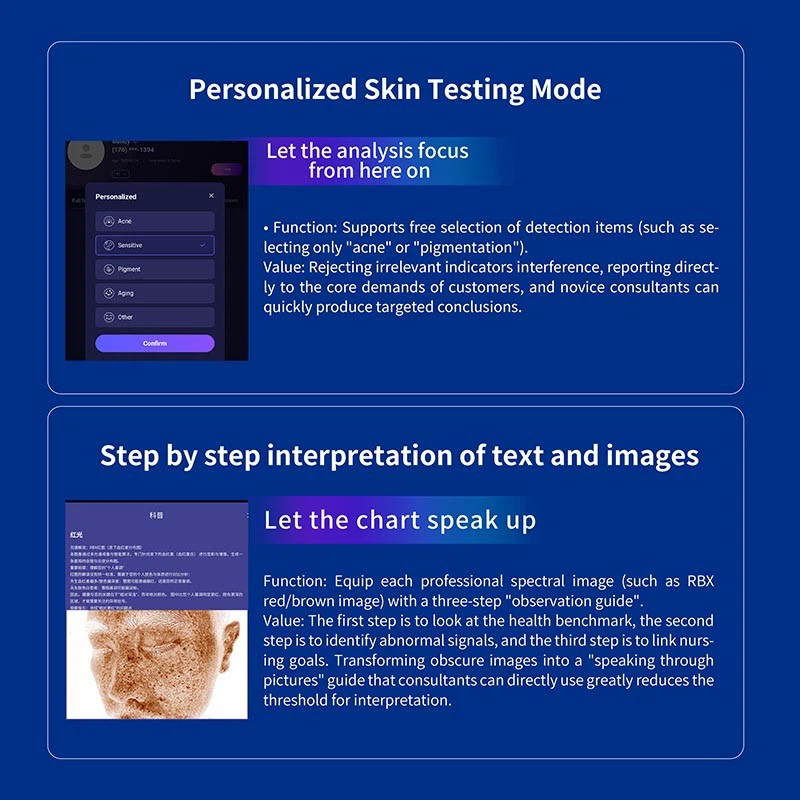


PixeAI Skin Consultation Workstation for Clinic Deployment
Deploy a structured skin consultation workflow with a 15.6-inch PixeAI imaging workstation. Review verified hardware, account permissions, record storage, staff training and configuration requirements before ordering.
Product Introduction
PixeAI Consultation Imaging Workstation for Structured Skin Reviews
Quick overview: This 15.6-inch imaging workstation is designed for salons and aesthetic practices that want a repeatable consultation process, organized client records and side-by-side review support. Its role is to document visible skin information for professional consultation-not to diagnose disease or replace medical judgment.
A Deployment-Focused Skin Consultation System
The PixeAI workstation gives consultation teams a consistent starting point before recommending skincare services. Rather than relying on memory or an unstructured visual check, staff can capture images, review visible concerns with the client and retain records for later comparison. Clinics evaluating other consultation and treatment categories can also review the broader professional skin care device range.
This page focuses on workflow deployment: workstation placement, account handling, image consistency, record review and staff responsibilities. It does not claim that software output is a medical diagnosis, and treatment decisions remain the responsibility of appropriately trained professionals.
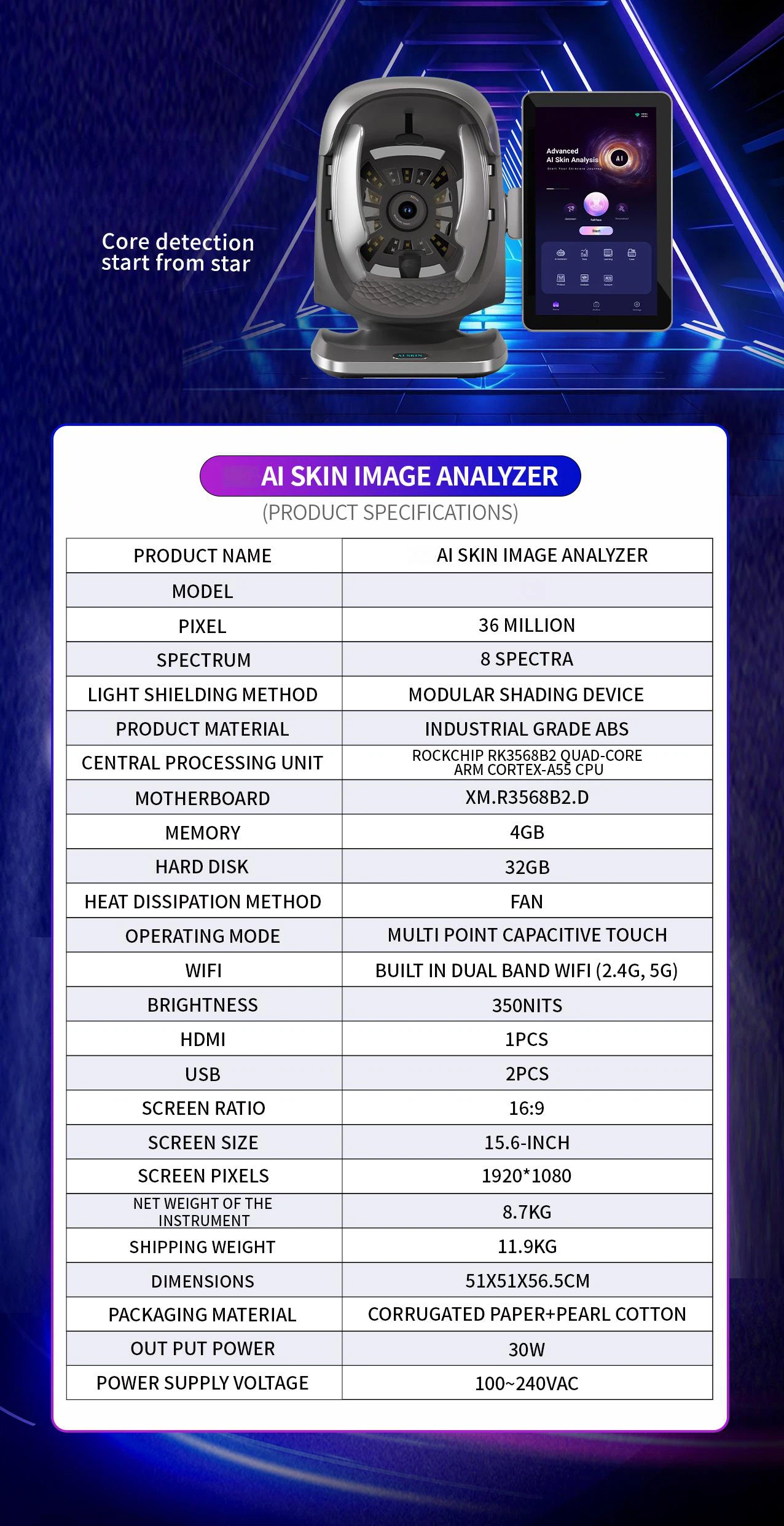
Verified Workstation Hardware
| Buyer checkpoint | Published configuration |
|---|---|
| Display | 15.6-inch HD touchscreen, 1920 × 1080 |
| Processor | Rockchip RK3568B2, quad-core ARM Cortex-A55 |
| Memory and storage | 4 GB RAM and 32 GB storage |
| Wireless connection | Dual-band Wi-Fi, 2.4 GHz and 5 GHz |
| Physical ports | 1 HDMI output and 2 USB ports |
| Input power | 100–240 VAC |
| Net / gross weight | 8.7 kg / 10.5 kg |
Buyers should ask for the current configuration sheet before ordering because software functions, probes, accessories and account services may vary by version or package. Do not assume that every unit includes the same cloud, scalp or microscopic accessories unless they are listed in the quotation.
Five Checks Before the First Client Session
1. Standardize the Capture Environment
Place the workstation in a stable consultation area and follow the supplied positioning instructions. Use a repeatable capture routine so later images are suitable for visual comparison. Room lighting, client positioning and operator technique should remain consistent.
2. Define User Permissions
Decide which staff members may create profiles, capture images, view records and export reports. Shared accounts make it difficult to audit access. Ask the supplier what user roles and password controls are available in the ordered software version.
3. Confirm Data Storage and Export
Before importing client information, verify whether records are stored locally, synchronized through an online service or exported through an approved workflow. Confirm retention, deletion, backup and account-recovery procedures. The clinic remains responsible for obtaining consent and following applicable privacy rules.
4. Separate Consultation from Diagnosis
Use the images and software output to support a visual skincare conversation. Staff should avoid presenting automated labels as a confirmed disease diagnosis. Suspicious or medically relevant findings require referral to an appropriately qualified healthcare professional.
5. Train Staff on a Consistent Review Script
A useful consultation explains what the client can see, what cannot be concluded from the scan and what next step is appropriate. Keep product or service recommendations separate from the image-capture process so the review remains transparent.
What to Request in the Deployment Quotation
- Exact hardware model, software version and included imaging modes
- Probe, accessory and replacement-part list
- Client-record storage, export, deletion and backup workflow
- Available interface languages and account permissions
- Remote installation, operator training and troubleshooting scope
- Product-specific certificate files, warranty terms and shipping configuration
For the current MNLT commercial model, 9-spectrum hardware packages and wholesale product specifications, use the MNLT Intelligent Skin Analyzer Machine product page. That page remains the primary commercial product source; this lasersbeauty.com page is limited to consultation deployment and data-handling checks.
Buyer FAQ
Can this workstation diagnose a skin disease?
No. It is presented here as an imaging and consultation-support workstation. It does not replace diagnosis by a qualified medical professional.
Does every package include cloud storage or a scalp probe?
Do not assume so. Ask the supplier to list the software services, probes and accessories included in the exact quotation.
What should a clinic verify before saving client records?
Confirm consent, user permissions, storage location, export, retention, deletion, backup and recovery procedures under the rules that apply in the destination market.
Can images be used for progress reviews?
They can support visual comparison when the capture environment, positioning and workflow are kept consistent. They should not be presented as guaranteed treatment evidence.
Ready to review the deployment requirements?
Send your country, buyer type, expected consultations per day, required interface language, record-management requirements, accessory list and destination voltage.
Request the PixeAI deployment and data-workflow checklist











Hot Tags: clinic consultation workstation, skin imaging workflow, client record management, PixeAI deployment
You Might Also Like




Send Inquiry
